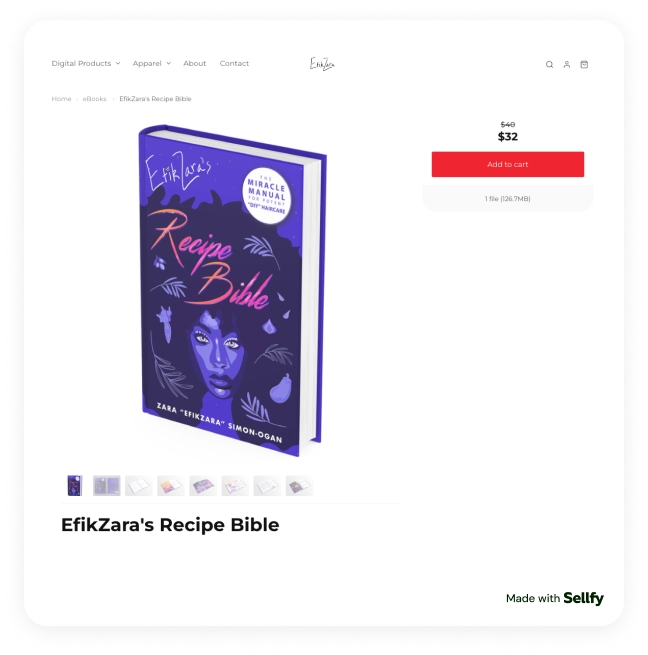
Selling ebooks is a great way to earn extra money, both as a side hustle or as a solid business specializing in ebook selling. There’s a variety of book genres you can sell:
- fiction,
- non-fiction,
- business and marketing ebooks,
- educational ebooks,
- research reports and industry guides,
- creative ebooks,
- niche-specific ebooks, e.g., cookbooks.
Selling ebooks is easy nowadays, and there are plenty of platforms for every taste and skill level out there. On another hand, I find such a vast choice overwhelming, especially if you are new to selling digital products online.
In this article, I will guide you through some of the best places to sell ebooks, so it’s easier for you to start your business. I’ve tested the most popular ebook platforms, compared their fees, and reviewed the tools that actually help you sell your ebooks.
Let’s dive in!
Where to sell ebooks online
Ebooks are digital products, so, essentially, you can go with any platform that allows selling them. But to make the choice easier for you, I paid special attention to platforms that offer smooth file delivery, simple setup, anti-piracy measures, and tools that help you create an ebook easily.
Top platforms to sell ebooks
Let’s start with some of the most versatile platforms to sell ebooks.
Sellfy: The best all-around place to sell ebooks
Sellfy is one of my favorites when it comes to selling ebooks. It’s an e-commerce platform where you can sell your products directly to your audience and keep 100% of your earnings. Sellfy offers many useful functions, including secure file delivery, anti-piracy tools, and built-in marketing tools.

Why I picked Sellfy
It’s important that my ebooks are protected from piracy, and Sellfy offers tools that help with that. Firstly, the platform generates unique download links for each buyer. Additionally, each link is limited to five download attempts. Sellfy also offers PDF stamping functionality, discouraging buyers from sharing your ebooks with third parties.
Sellfy has everything I could think of for selling ebooks online. You can choose a customizable store theme, easily upload your files, and start selling. There’s no limit on how many ebooks you can upload. Plus, you can pack up to 50 files per product, meaning you can sell one book in various digital formats.

Payments are processed automatically through integrations with Stripe and PayPal, and there are no transaction fees, unlike on many other platforms.
Sellfy also offers a decent set of built-in marketing tools. Think e-mail marketing, cart abandonment e-mails, upsells, promo codes, affiliate marketing tools, and more. These tools and built-in analytics help you steadily grow your income.

Standout features
- Instant delivery for digital files
- Accept payments globally via PayPal and Stripe
- You can also sell physical books
- Fully customizable store with pre-designed themes
- Analytics dashboard to monitor sales and audience behavior
- Anti-piracy features to protect your work
- Affiliate program to grow your audience
- Third-party apps and services
- 24/7 customer support
Pricing
Starter Plan: $22/month (billed annually)
Business Plan (best value): $59/month (billed annually)
Pros and cons
| Pros | Cons |
|
No transaction fees, you keep 100% of your earnings |
You are responsible for driving traffic to your store |
|
Secure payment processing |
|
Amazon Kindle Direct Publishing: Best for independent authors who want to self-publish ebooks
Amazon Kindle Direct Publishing, also known as KDP, is Amazon’s ebook publishing platform. It offers publishing in 45+ languages in more than 10 countries. KDP gives you an opportunity to publish your work for free and reach a wide audience on Amazon.
Why I picked Amazon Kindle Direct Publishing
You can publish and sell both ebooks and print books. It’s important to mention here that not all types of ebooks are supported, e.g., you won’t be able to sell magazines, calendars and other products.
When publishing with KDP, you have full control over the design, content, pricing, and advertising. As an author, I find it pretty cool as it helps keep my works authentic. Another important thing is that authors keep the rights to their work.

When it comes to earnings, I find KDP’s scheme a bit tricky. You can earn in several ways:
- For regular Kindle ebook sales, authors can earn 35% or 70% of the list price. The type of royalties depends on several factors, e.g., selling ebooks in certain countries;
- For Kindle Unlimited sales, you’re paid per page read, not per book sale. There’s a specific formula to estimate your earnings;
- For paperback/hardback sales, you earn a 60% royalty of the list price, minus printing costs.
Standout features
- Different format support (DOCX, EPUB, MOBI, etc.)
- Cover Creator tool to create a unique cover for your ebooks
- Amazon Author Central for creating your Author’s page
- Analytics to keep track of your Sales Rank and Customer Reviews
- Integration with Goodreads Author Program
- Advertising tools (Amazon Ads)
Pricing
Free to register and publish, the platform takes a share of your revenue.
Pros and cons
| Pros | Cons |
|
No built-in marketing tools |
|
|
Vast international audience |
|
|
Full control over your ebooks |
No customized storefront and flexibility |
|
Useful tools, e.g., Cover Creator |
|
Kobo Writing Life: Best for authors who want to maximize control
Kobo Writing Life is a self-publishing platform with international coverage. They help independent authors self-publish and promote ebooks and audiobooks. The platform also allows you to distribute your books to libraries.
Why I picked Kobo Writing Life
I know freedom means a lot to independent authors, and Kobo Writing Life gives you full control over every aspect of publishing and selling your ebooks. There is no exclusivity requirement, meaning I can publish on different platforms while still benefiting from Kobo’s global footprint.
Kobo Writing Life also offers a set of tools designed specifically for authors. You have full control over the content, pricing policy, release dates, and promotions. Kobo gives authors access to readers in more than 190 countries, so you’re not bound to just one specific market.
Additionally, you can distribute your books to libraries with Kobo’s OverDrive integration. I think it’s a fantastic way for authors to reach new audiences.

Kobo offers up to 70% royalties, depending on your book price. To get 70%, your book price must not be lower than Kobo’s set minimum in different regions. The book also needs to be your original work. Unlike some other platforms, Kobo does not charge delivery fees.
Standout features
- Detailed sales analytics
- OverDrive integration for distribution in libraries
- Promotion tools, e.g., Daily Deal, Buy More Save More, Promo code sales, etc.
- Analytics: real-time and monthly reports on book performance, etc.
- No ISBN requirement
- Kobo Plus enrollment: enroll your ebook in Kobo’s subscription service for potential additional revenue
Pricing
Free to register and publish, the platform takes share of your revenue.
Pros and cons
| Pros | Cons |
|
Free account and publishing |
No dedicated author pages, making it more difficult to introduce yourself to readers |
|
Audience in more than 190 countries |
Minimum payout threshold of CAD $50 |
|
No exclusivity requirement |
|
|
Authors keep up to 70% royalties |
|
|
You can upload audiobooks as well |
|
|
Payouts directly to your bank account |
Best ebook marketplaces
Let’s explore a few marketplaces that will allow you to reach more readers.
Apple Books: Best for reaching iOS users
Apple Books is Apple’s ebook store with a strong reach to iPhone, iPad, and iMac users. It’s an app that is built on all Apple devices, so users instantly have access to the marketplace. It’s easy to use and allows both ebooks and audiobooks.
Why I picked Apple Books
I was amazed to learn that there are more than 1.38 billion active iPhone users worldwide, while the total iOS share on the global market is 28–29.2%. Selling ebooks on Apple Books allows you to reach a vast global audience.
Apple strives to make ebook publication as smooth as possible for authors. The platform supports many formats, like Pages (a native Apple app), MS Word documents, EPUB, PDFs, and more.
Apple offers 70% royalties without a minimal price threshold, doesn’t charge any delivery fees, and has no fees for preferential store placement.
Another cool thing I liked is that you can easily turn your ebook into an audiobook with Apple’s digital narration solution.
Standout features
- Knowledge database with advice from successful authors
- Digital narration technology for creating audiobooks
- You can upload your book in different formats: DOCX, EPUB, PDF, etc.
- Statistics to follow your sales and market trends
- Promotion tools, e.g., affiliate program, promotion on Apple Books (you will need to request it)
- You can create interactive ebooks filled with media, e.g., embed videos and picture galleries
Pricing
Free to register and publish, the platform takes a share of your revenue.
Pros and cons
| Pros | Cons |
|
Global reach for Apple users |
Lower market share compared to Android users |
|
You keep 70% royalties, no matter the book price |
Might be challenging to use for non-iOS users |
|
Strong support: knowledge database with advice on writing and ebook publishing |
|
|
You can easily transform your ebook into an audiobook to reach more people |
|
|
No exclusivity requirement |
|
|
Digital Rights Management (DRM) to protect your ebooks from piracy |
Google Play Books: Best for reaching Android users
Google Play Books is an online bookstore and app used by people worldwide to read ebooks on their Android devices. Google offers a Books Partner Centre for authors to upload, manage, and sell their works. It’s a simple, intuitive tool that makes selling ebooks a smooth process.
(
Sellfy protects your PDF ebook from illegal sharing by stamping buyer’s email address on each page

Why I picked Google Play Books
Google Play Books allows you to reach more than 3.9–4.5 billion active users, making it a 70.8–72% of the global market share. Publishing on Google Play Books can help you get international recognition in more than 75 countries.
The process of publishing an ebook on the platform is easy: you create an account, upload the file, and start selling. You can use promotional tools, e.g., Adwords, promo codes, discounts, etc. You can also use Google’s Blogger platform to start your own page and connect with readers.
Publishing with Google Play Books is free. There are two types of royalties authors can receive. The default revenue split is 52%, applicable for those who have not accepted Google’s updated Terms of Service, and for ebook sales in certain countries. Maximum revenue split is 70%, but you need to accept the Terms of Service.
Standout features
- Google indexes the full text of your ebooks, making them discoverable when users search on Google Books or Google.com for keywords found within your work.
- Book previews: Before buying a book, users can see a few pages of the book, not only the summary.
- Promotional tools, e.g., series bundles, promo codes, etc.
- You can use Google AdWords to advertise your ebooks
Pricing
Free to register and publish, the platform takes a share of your revenue.
Pros and cons
| Pros | Cons |
|
No exclusivity requirement |
File support is limited to PDF and EPUB |
|
Digital Rights Management (DRM) to protect your ebooks from piracy |
Many users admit the interface for authors is not user-friendly |
|
You are in full control of your pricing policy |
|
|
Direct integration with Google Search: your work can be found in many ways, not just the Google Play Books app |
|
|
Sales tracking and reporting |
Barnes & Noble Press: Best for reaching U.S. ebook readers
Barnes & Noble Press, formerly known as Nook Press, is a self-publishing platform for the Barnes & Noble bookstore ecosystem. The platform allows you to publish ebooks for free and sell them to millions of Nook users. I liked it for the simple publishing flow and quick start for selling.
Why I picked Barnes & Noble Press
If you aim at the U.S. market, Barnes & Noble Press is one of the top choices. It attracts true reading lovers thanks to an app that allows a bookshop-like shopping experience. Creating an author’s account and publishing is free, so you don’t need any budget to start.
Barnes & Noble Press offers a clean dashboard, tools for promotion and sales tracking, and strong support for authors. If you are looking for something more advanced, B&N Press has partnerships with different platforms where you can find editors, designers, and even beta-readers to fine-tune your book.

As for royalties, authors get 70% of the book price, no matter the book price. You can increase your earnings, publishing a print book directly with B&N Press.
Standout features
- Clean sales monitoring
- Promotional tools, e.g., B&N email marketing, affiliate marketing, etc.
- Partnerships with platforms to reach editors, designers, beta-readers, etc.
- Author’s knowledge database with advice on creating and marketing your books
- Unified platform: your book will be featured on their website and on all Nook devices and apps
Pricing
Free to register and publish, the platform takes a share of your revenue.
Pros and cons
| Pros | Cons |
|
No exclusivity requirement |
No dedicated author’s page on the platform |
|
Royalty rate does not depend on the book price |
Rather limited marketing tools. You will need additional marketing resources, e.g., your own website, social media platforms, etc., to promote your book |
|
Authors consider B&N Press as one of the user-friendly platforms |
|
|
Pre-orders available to help you promote your book |
|
Top ebook selling platforms
Let’s explore a few book-selling platforms that help authors publish and sell ebooks to multiple retailers at once. This approach lets you reach a wider audience without managing several stores.
Draft2Digital: Best for distributing your ebook everywhere at once
Draft2Digital is one of the most popular ebook publishing platforms for authors who want broad distribution. I like it for simplicity: you just need to upload your manuscript, the platform will format it automatically, and send your ebook to a wide network of stores and libraries.
Why I picked Draft2Digital
Thanks to an easy and smooth process, Draft2Digital is very beginner-friendly. It allows you to reach a broad audience with minimal manual work. Instead of uploading your ebook to multiple platforms, like Apple Books, Google Play Books, Kobo, etc., you can publish just once and be present on major platforms.

I also like Draft2Digital for automating the conversion of the manuscript to give your books a professional look. The platform offers such tools as automated endmatter, metadata, error detection, and live status announcements.
There are no up-front fees for Draft2Digital’s services. While the platform itself takes 10% off the sales, keep in mind that you will get approximately 60% of your book price, as most of the stores take 30%. The good news is Draft2Digital will show you estimated royalties based on your list price.
Standout features
- Supports different file formats, including RTF, OTF, TXT, etc.
- Automatic conversion to high-quality ebook files (EPUB, MOBI)
- The platform offers templates for designing your manuscript
- Wide distribution network
- Sales tracking
- Promotions: reader notifying, price promotions, etc.
- Strong tools for ebook management: automated endmatter, metadata, etc.
- Customizable author pages
Pricing
Free to register and publish, the platform takes a share of your revenue.
Pros and cons
| Pros | Cons |
|
No exclusivity requirement |
Your royalties vary from bookstore to bookstore when distributed with D2D |
|
No built-in anti-piracy tools |
|
|
Custom landing page for your ebook |
|
PublishDrive: Best distributor with AI tools
PublishDrive is an ebook publishing platform for authors seeking to sell their books in multiple countries and formats. It allows you to sell ebooks, print, and audiobooks in more than 50 stores and 240 000 libraries across the world.
Why I picked PublishDrive
I think PublishDrive is the best option if you are looking to automate everything and focus on what you like the most, i.e., writing. The platform offers AI tools for creating optimized titles, descriptions, and blurbs, designing professional covers, and market recommendations.
With PublishDrive, it’s easy to format and convert your manuscript to EPUB or MOBI, you don’t even need to create an account for that. You can also easily promote your ebook: it allows managing Amazon Ads directly from the platform, runs discounts on different ebook marketplaces, and gives you a chance to get featured on book promotion websites.

Selling your books with PublishDrive, you keep 100% of the royalties with a subscription, excluding the store share. E.g., if the store takes 30%, you will receive the remaining 70%.
Standout features
- Automated promotions: You can schedule price promotions and discounts across multiple stores from one dashboard
- Book featuring in curated lists and newsletters
- AI-powered tools for optimizing and editing your manuscripts
- Review copies you can send to influencers, critics, etc.
- Detailed sales analytics
- Transparent royalty splitting
- Abacus: A tool for managing royalties in one place
Pricing
Annual Free Plan: $0, but you can publish only 1 book per year
Annual Starter (best value): $13.99/month (billed annually); you can publish up to 3 books per year.
Pros and cons
| Pros | Cons |
|
Smooth management from one dashboard |
No direct distribution to Amazon |
|
User-friendly even for beginners |
No built-in anti-piracy tools, PublishDrive relies on its partners to use DRM (Digital Rights Management) |
|
Simplified store submission |
IngramSpark: Best for professional publishing with marketing support
IngramSpark is a self-publishing platform for authors who are looking to sell both ebooks and print books worldwide. With IngramSpark, you can sell your ebook on major ebook marketplaces and apps and keep 85% of your earnings regardless of retailer.
Why I picked IngramSpark
First and foremost, it has a simple royalties policy for ebook sellers. IngramSpark does not have a monthly subscription fee, nor does it take a part of your earnings in addition to what ebook stores take. I think it’s one of the most efficient royalty approaches, compared to other similar platforms.

IngramSpark got me with comprehensive marketing tools, like curated lists, targeted marketing communication, metadata enhancements, shareable purchase links, author website builder, etc. They even offer an expert database who can help you with editing, cover design, marketing, etc. Worth noting that these are paid extra services.
Standout features
- Free publishing tools, including guides, courses. etc.
- Free book-building tool
- Additional paid tools, e.g., advanced marketing, editing, designing, etc.
- Streamlined ebook management from one platform
- Partnerships with major ebook retailers
Pricing
Free to register and publish, the platform takes a share of your revenue.
Pros and cons
| Pros | Cons |
|
Rather limited free tools for marketing |
|
|
Opportunity to also sell print books |
No built-in anti-piracy tools |
|
Higher royalties compared to other similar platforms |
Best ebook-selling websites
Let’s explore some of the best websites to sell ebooks with unique features to help you reach readers worldwide.
Lulu: Best for maximizing royalties
Lulu is a self-publishing platform that allows authors to sell ebooks and print-on-demand books directly from their own website, online store, or social media. There are no upfront fees, and you keep a share of your earnings depending on the sales channel.
Why I picked Lulu
I like that Lulu gives authors freedom when it comes to sales channel choice. For the best revenue, you can publish books on Lulu Bookstore. For a broader presence, there’s an option to sell ebooks with Lulu’s retail distribution with over 40 000 retailers. If you want to increase your earnings and sell print books, Lulu offers a Lulu Direct solution to sell print-on-demand books.
Lulu’s ebook creator is free. It converts your DOCX into an EPUB or PDF file, plus you will receive a free ISBN if you don’t have one already. Another two things I think are important is that you keep all the rights and there is no exclusivity requirement, so you can sell your book on other platforms, too.

With Lulu’s Global Distribution, authors keep 90% of the revenue based on the wholesale price Lulu sets for each retailer. This means that retailers can put your ebooks on promotion or raise the price, but your payout always stays the same. Upon uploading your book to Lulu, you will see the calculations.
Standout features
- High revenue share compared to other websites
- Free formatting to EPUB or PDF
- Free ISBNs
- POD service if you want to sell print books
- Can be embedded on your existing website
- Compatible with major e-commerce platforms like WooCommerce, Shopify, etc.
Pricing
Free to register and convert your file, the platform takes 10% of your earnings. There is a one-time $4.99 review fee the first time you submit an ebook for global distribution.
Pros and cons
| Pros | Cons |
|
Full control over your books |
There’s a one-time review fee when publishing an ebook |
|
You may want to have a solid marketing plan to boost your sales |
|
|
One dashboard for all books in all formats |
|
|
Authors retain all the rights to their books |
|
|
No exclusivity requirement |
BookBaby: Best for publishing professional-grade ebooks
BookBaby is a self-publishing platform offering a seamless ebook creation process and ebook and print distribution. It’s perfect for authors who are looking for a more hands-off experience. The platform takes care of formatting, conversion, and distribution, and has optional marketing packages.
Why I picked BookBaby
BookBaby stands out with expert services like editing, cover design, formatting, and marketing packages. I think this approach makes ebook publishing and selling an easy process, even for beginners. Your ebook will be as polished as traditionally published titles.
With BookBaby, you will also be able to distribute your work to all major retailers, e.g., Amazon, Apple Books, Kobo, and more. Again, it’s easier to manage all your sales through one platform compared to juggling multiple ebook selling platforms.
Another great thing about BookBaby is that as an author, you keep 100% of the net sales from the retailers. Plus, you keep all the rights. And, compared to many other platforms, BookBaby offers payouts every week.

While there are no commissions when selling with BookBaby, you will need a starting budget to use their services, and I find this a little daunting. For example, converting your work to an ebook will cost you from $99, and distributing it to their retailer network costs $299.
Standout features
- Finished EPUB formatting proof of your ebook to review how the published book will look like
- Compatibility testing: BabyBook tests each file on e-readers to ensure great performance
- Different source files supported: DOCX, PDFs, InDesign files, etc.
- Free customer support
- META Ads: additional marketing packages to promote your ebook
- Fixed Layout tool for visually rich ebooks
- Possibility to set up your own BookBaby bookshop for direct sales
Pricing
There are no subscription plans; rather, different services require separate payments:
- Ebook conversion: from $99
- ISBNs: $79
- Distributing to resellers: $299
Pros and cons
| Pros | Cons |
|
Professionally-looking ebooks |
|
|
Support on every step: additional services like editing, design, etc. |
Even with the marketing services they offer, to boost sales, you will need a solid marketing strategy and an existing follower base for high sales |
|
Wide reseller network: 60+ stores in 170 countries |
|
|
100% satisfaction guarantee: they promise to work with your book until you are fully satisfied with the quality |
|
GlobalComix: Best for selling digital comics
If you are an artist working in the visual storytelling genre, GlobalComix is one of the best options to sell comic ebooks. It’s a digital publishing platform for comic creators, graphic novelists, and manga artists.
Why I picked GlobalComix
GlobalComix stands out as a platform specifically designed for visually rich ebooks. It supports selling your work as downloadable PDFs. You can publish unlimited comics, whether you work in traditional page layouts or vertical-scroll formats.
The platform boasts more that 140 000+ published books, which might sound like a lot of competition at first. But I think it works in your favor, because GlobalComix already has a big audience of comic and graphic novel fans.

Monetization options are flexible. Besides selling downloadable PDFs, you can also use subscriptions, arrange crowdfunding campaigns and accept donations. The royalty rates are 65-70% of the revenue share on comic sales and 92-25% on donations.
Standout features
- Vertical-scroll and traditional page layout support
- Free to publish unlimited series and issues
- Advanced analytics for both sales and reader behaviour
- Built-in marketing tools like promo codes, contests, etc.
- Crowdfunding integration
- Payouts via Stripe or PayPal
- Integration with WordPress, WIX, etc., for direct sales
Pricing
There are no subscription plans, the platform takes a share of your revenue:
- 65-70% on subscriptions and PDF sales
- 92-95% on donations
Pros and cons
| Pros | Cons |
|
Multiple revenue channels: sales, donations, crowdfunding |
Payout threshold: you need at least $30 before you can request a payout |
|
Free publishing, no subscription fees |
To reach a wider audience, you will need additional marketing tools |
|
Industry analytics to help you attract more readers |
|
|
Customizable author profile |
|
|
You can use your profile as a professional portfolio |
Best places to sell ebooks without upfront fees
Here are some great platforms for authors who want to sell ebooks without spending money at the start.
StreetLib: Best for reaching worldwide audience
StreetLib is a self-publishing platform that helps authors distribute their ebooks worldwide across major retailers, subscription platforms, and libraries. If you are looking for ways to reach a wide international audience from one account, StreetLib is a great choice.
Why I picked StreetLib
StreetLib stands out for its global distribution network including retailers like Amazon Kindle Store, Apple Books, Google Play Books and more, over 40 partners in total. I appreciate the option of managing ebook sales from one platform instead of running tens of different platforms.
I also noticed StreetLib paying close attention to complying with new European regulations that require certain companies to produce accessible eBooks. The platform offers a variety of services to make your ebooks accessible, like automatic validation and updating existing EPUBs to meet the new standards.
While StreetLib offers several plans for authors, the Basic Plan is free, which is perfect for beginner and indie authors. With the Basic Plan, you will get 70% of the net revenue, which is an average amount compared to other self-publishing platforms.
Standout features
- Global distribution to 40+ retailers and subscription platforms
- Integration with library networks like OverDrive and Odilo
- Real-time data insights to boost your sales
- Option to sell audiobooks (available for Pro and Enterprise plans)
- StreetLib Direct for distributing ebooks directly to readers (included in the Pro Plan)
- StreetLib Write tool: cloud-based platform for writing, editing and publishing your ebooks.
Pricing
Basic Plan: Free, authors get 70% of the net revenue
Pro Plan: $99/year with 85% royalties of the net revenue.
Pros and cons
| Pros | Cons |
|
No exclusivity requirement |
You can upload only 10 titles undre Free Plan |
|
Additional services available, like editing, cover design, etc. |
Minimal threshold of $30 for payouts if you choose PayPal and $200 for bank transfers |
|
Single dashboard to simplify ebook management |
|
|
Access to both retailers and libraries |
|
|
Transparent royalty policy |
Leanpub: Best for iterative publishing
Leanpub is a platform where you can write, publish, and sell ebooks and online courses. It combines a simple writing process with a built-in workflow. One of the unique features is that you can sell your ebooks while they are still in progress (e.g., sell separate chapters).
Why I picked Leanpub
Leanpub gives you flexibility in your working process, allowing you to write, publish, and update your books on your preferred schedule. It’s perfect for authors preferring iterative writing: you can release drafts of your novel or textbook chapter by chapter.
If your book is finished, you can upload a PDF or an EPUB file and publish it instantly. Leanpub offers variable pricing models and up to 80% royalties to authors. There’s a unique feature: you set the minimum price, and buyers have an option to pay more. They see what you will receive as an author, so they might be willing to pay a little extra.
A dedicated book page is also something I found great. Besides a synopsis, it contains a table of contents, information about the author, testimonials, and bundles if available. I think it makes the book more appealing to readers.
Standout features
- Iterative editing and publishing possibility
- Markdown: built-in writing tool for authors
- Your own file upload and conversion
- Leanpub Bookstore with global reach
- Detailed book landing page and Author’s page
- Readers can choose to pay more than the minimum price
Pricing
Free Plan: no subscription fees, up to 100 books, 80% royalties
Standard Plan: $89/year, with additional functions like writing in multiple Markdown files
Pros and cons
| Pros | Cons |
|
Limited marketing tools, you will need additional traffic sources |
|
|
Flexible publishing and pricing model |
Minimal threshold of $20 for payouts if you choose PayPal and $100 for Wise transfers |
|
Simple, easy-to-use platform |
|
|
Sales breakdown on demand |
|
Tentary: Best for simple, all-in-one ebook selling
Tentary is an all-in-one platform where you can sell ebooks, PDFs, and other digital products. It is designed for authors who want a fast and easy way to publish and monetize their knowledge or creative work.
Why I picked Tentary
What stood out to me the most is how beginner-friendly Tentary is. You can start selling your ebooks literally in minutes: just create a product page, upload your ebook, choose payment methods, and share your link.
There are no hidden fees, no subscriptions, and no tech setup. What I also liked are the legal and tax compliance tools. Tentary automates EU VAT and invoice generation, so you won’t need any additional software for accounting.
Tentary is a subscription-based platform with only one plan that is €7.99/month, plus they charge a 0.9–2.9% transaction fee, which depends on your total revenue. And that’s all, you get to keep 100% of your earnings.
Though you can sell different genre ebooks, most authors use it for cookbooks, manuals on specific subjects, training books, etc.
Standout features
- Automatic global tax calculation & invoicing
- Instant digital delivery after purchase
- Accepts all major payment methods
- Individual sales pages
- Author’s profile page
- Traffic- and revenue reports, monthly reports
- Automatic EU VAT tax calculation
- Supports multiple formats
Pricing
€7.99/month plus 0.9–2.9% transaction fee.
Pros and cons
| Pros | Cons |
|
PDF stamping/watermarking for protection |
Growth depends on your own traffic |
|
Rather limited marketing tools |
|
|
Strong legal compliance and tax automation |
|
|
You can sell multiple types of digital products, including online courses |
Selling ebooks nowadays is easier than ever, thanks to a variety of platforms catering to every type of author. Some platforms, like Sellfy, give you full freedom over your ebook selling business, some platforms are less flexible, but offer unique options like cover design services, etc. The key is choosing a platform that supports your workflow and helps you reach the right readers, so that you can steadily grow your ebook sales.
FAQ
Is selling ebooks profitable?
Yes, selling books can be very profitable depending on your strategies. Before publishing your ebooks, we recommend considering the following aspects:
- Genre: Research trends and demand in your target market.
- Pricing strategy: Consider market prices and don’t forget the share most platforms take from your revenue.
- Distribution channels: Decide on specific countries and platforms, e.g., if you want to focus on a specific seller like Amazon or use aggregators like PublishDrive.
- Marketing: Most platforms offer basic marketing tools, but you might want to consider a dedicated author’s website and boosting your online presence with social media.
How much can I sell an ebook for?
The average price for an ebook is between $0.99 and $9.99, depending on the genre. volume and interactivity of the book. When considering the price, make sure to include the share that sellers take from your earnings. Most of the platforms take 30% of the listing price.
Can I sell my ebook for free?
Yes, you can sell ebooks online for free, many platforms, like Amazon KDP, Draft2Digital, and others, allow doing so. Giving your ebook for free is a great way to build visibility, gain your fan base, and generate an email list to market and sell your other ebooks in the future.

Susanna is Sellfy’s Content Guru with a genuine passion for copywriting, storytelling, and eCommerce. With years of content marketing experience behind her, she helps to create the best possible landing pages, blog posts, emails, and other types of copy. She also keeps close tabs on social media trends and enjoys digging deep into marketing psychology.