You’ve heard that using a VPN is essential, but what exactly does it do? Read our article to discover 7+ common VPN uses.
Key Takeaways
- VPNs offer benefits beyond privacy, including cost savings and improved network performance.
- Location switching allows travelers to access local pricing for flights and rentals by changing their IP address.
- Router-installed VPNs secure vulnerable IoT devices, such as smart fridges, that lack built-in protection.
- Public Wi-Fi risks are neutralized by VPN encryption, preventing Man-in-the-Middle attacks wherever you are online.
A Virtual Private Network, or VPN in short, is an essential tool for safe and secure internet access.
A VPN allows you to:
- browse the web through a third-party server;
- hide your IP address;
- and encrypt your internet activity data.
But you might be wondering, what does that even mean? In practical terms, what can you really use a VPN for?
In this article, we’ll explain just that! Here’s what you’ll learn:
- What the most common VPN uses are
- How a VPN allows you to browse the web securely and anonymously.
- How you can use a VPN to avoid throttling, ISP tracking, and more.
So, let’s get right to it.
7 Essential VPN Uses
Prefer a quick summary? Here’s a complete list of potential VPN uses. You can use a VPN to:
- Protect yourself from Wi-Fi hacks
- Improve your connection speed
- Access your favorite sites when you’re abroad
- Stay safe while working remotely
- Saving money on purchases
- Secure household appliances
- Beat Bandwidth Throttling
Read on to learn more about each of these VPN uses.
#1. Protect Yourself From Wi-Fi Hacks
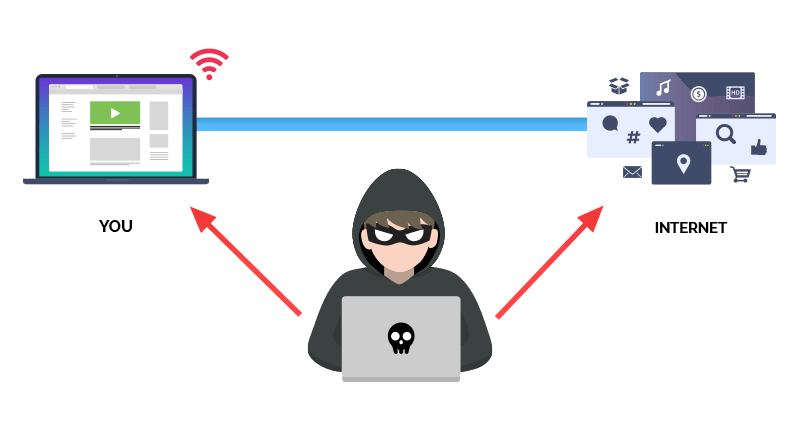
We’ve all done it: connected to the “Free Coffee Shop Wi-Fi” without a second thought. But public Wi-Fi is a goldmine for hackers. Because these networks are often unsecured, a hacker can easily intercept the connection (a Man-in-the-Middle attack). They can sit between you and the router, watching everything you do.


Using a VPN, however, can protect you from hackers. A VPN encrypts your online activity, so even if a hacker intercepts the connection, they won’t be able to access your data or see any activity that isn’t encrypted (email activity, HTTP web browsing, DNS traffic, etc.).
#2. Improve Your Connection Speed
When too many people try to access a hotspot, website, or app simultaneously and the connection becomes sluggish, it’s called network congestion. This occurs when a server node is forced to handle more traffic than it can process.
In simpler terms, network congestion means that:
- The server is unable to handle the traffic
- It starts queuing up the requests instead of executing them instantly
- In turn, this significantly slows down your internet speed
Using a VPN, however, allows you to bypass the congested server and speed up your connection.
#3. Access Sites Abroad
If you’re traveling abroad, there’s a chance that some of your favorite websites are banned or blacklisted. For example, if you’re visiting China, you can’t use some of the most popular US websites and apps, including Twitter, Google, Wikipedia, and others.
Because a VPN routes your traffic through a different server (in a different country), you can safely and easily bypass website restrictions.
#4. Stay Safe While Working Remotely
If you’re working remotely, there’s a good chance you change locations frequently.
One day you’re working from home, and you’re at your favorite coffee shop the next.
What you probably don’t know, though, is that working from public Wi-Fi can be a serious security threat to your employer.
As we’ve mentioned before, a hacker can easily intercept your Wi-Fi connection and steal your account credentials at best, or at worst, gain access to your computer.
When this happens, the hacker can gain access to your work network and cause some real damage.
To avoid this, it’s essential to use a VPN while connected to public Wi-Fi. In fact, some of the largest fully remote companies require VPN use for their employees.
#5. Save Money on Purchases
Using a VPN isn’t just about privacy; it can also be a direct money-saver. Many online retailers, specifically airlines, car rental agencies, and digital software providers, use “dynamic pricing.” This algorithm adjusts the price you see based on your location, often charging more to users in affluent regions or major cities.
- How to do it: Before making a major purchase, clear your browser cookies (or use Incognito mode) and set your VPN to a country with a lower cost of living, or to the airline’s home country.
The Result: You may see significantly lower prices for the same flight or service, effectively paying the “local” price rather than the “tourist” price.
#6. Secure Household Appliances
The modern home is filled with Internet of Things (IoT) devices—smart fridges, baby monitors, Ring cameras, and connected thermostats. Unlike your laptop or phone, these devices rarely have built-in antivirus software, and you cannot install a VPN app directly onto a smart lightbulb. This makes them the “weakest link” in your network security.
Instead of installing a VPN on each device, you install the VPN directly onto your Wi-Fi router. This creates a secure “umbrella” over your entire house. Any data leaving your smart fridge or security camera is automatically encrypted before it hits the internet, preventing hackers from snooping on video feeds or compromising your home network through insecure appliances.
#7. Beat Bandwidth Throttling
Have you ever noticed that your internet speed suddenly drops when you start streaming Netflix, gaming, or downloading large files?
This is often due to ISP Throttling. Internet Service Providers (ISPs) sometimes inspect your traffic and intentionally slow specific high-bandwidth traffic to manage their networks.A VPN hides the type of traffic you are sending. Your ISP can see that you are using data, but they can’t see what that data is. If they can’t tell you’re streaming 4K video, they can’t automatically throttle you. In this specific scenario, a VPN can actually boost your effective connection speed.
How to Pick the Right VPN
At this point, you’ve probably already decided to get a VPN — the benefits are too great to pass on.
You should keep in mind, though, that not every VPN can be used for the cases we’ve mentioned in this article.
Some VPNs, for example, can’t bypass the Great Firewall of China. Others log your data themselves, making it impossible to stay truly anonymous on the internet.
If you want all the VPN uses we’ve described in this article, you’ll want to pick one of the best VPNs on the market.
Not sure how to do that? Look for a VPN that comes with:
- Verified no-traffic-log policies. Some VPNs log your data and resell it to third-party entities. This goes against the whole point of using a VPN! When looking for a VPN, look for one with a strict no-logs policy and an independent third-party audit.
- 256-bit encryption. This encryption is the industry standard and is unbeatable by even the best hackers and supercomputers.
- iPhone and Android apps. If you want to stay completely anonymous and secure online, you need to use a VPN on all your devices, including your iPhone, Android, laptop, and router. The VPN you use must have a mobile version.
- Servers across the globe. The more servers a VPN has, the more likely it is that they have servers closer to your location (which means even faster speed).
VPN Uses FAQ
#1. Do I need technical knowledge to use a VPN?
Nope, none!
Using a VPN is extremely easy, even if it’s your first time using it.
All you have to do is:
- Create your account.
- Go on and download our VPN.
- Launch the app, and follow the setup instructions.
- Select a server location, then “Connect”.
And that’s it, you’re good to go!
#2. Is it legal to use a VPN?
For most countries, yes, it is.
Using a VPN is illegal in only a handful of countries, including North Korea, Iran, and Hong Kong.
For a complete list of countries where VPNs are illegal, see our guide.
#3. Can I use a VPN for free?
Technically, yes. There are VPNs out there that don’t cost money.
But if you’re thinking that’s too good to be true, that’s because it is.
Free VPNs come with many safety concerns, all of which contradict the point of using a VPN:
- Logging your data and selling it to advertisers
- Selling your bandwidth to third parties
- Install malware onto your device
- Slow speeds and data caps
So, yes, you can use a free VPN.
However, you’ll open yourself up to more security and safety concerns than from not using a VPN in the first place!
